Custom ML Systems - Galific Solutions

AI-Powered Automated Workflow,

AI-Powered Automated Workflow, designed by Galific Solutions, skyrockets business operations and efficiency. Also, our tools will be able to integrate with your existing platforms. Hence, you can achieve the desired outcome without rebuilding them from scratch. Consequently, if you are already using digital tools, you can enhance their effectiveness with our tools. Therefore, we design workflows tailored to your needs that minimize the need for human intervention. Our purpose in introducing automation is to relieve you of repetitive tasks, allowing you to focus on creative work

Contact Us

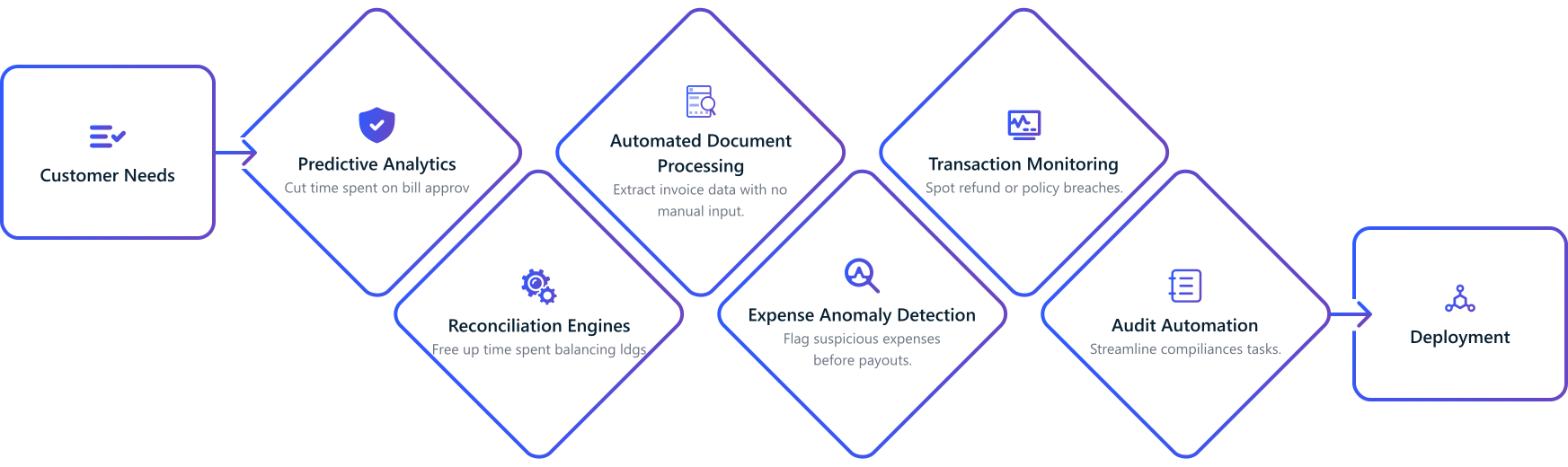
Step By Step Approach

We build intelligent workflow automation solutions that integrate AI into your operations to eliminate manual tasks, speed up processes, and boost productivity. From lead qualification to ticket routing and operations, we automate what slows you down.Operational speed meets smart automation.

chart

Galific Solutions offers you a list of AI-Integrated Workflow Services

count

Eliminates Repetitive and Manual Tasks

For example, repetitive approvals consist of indefinite follow-ups and manual entries. Furthermore, our AI-powered automated workflow solutions are designed to eliminate redundant processes and human efforts, enabling them to perform creative tasks.

pattern
design
count

Set Smart Rules for Scheduling and Escalations

Furthermore, you can set the terms using our automated workflow, such as allocating and scheduling tasks to various departments, triggering alerts, or automatically escalating issues.

pattern
design
count

Usage of APIs and Low-Code Tools for Integration

To illustrate, the APIs and low-code solutions can seamlessly integrate our computerized workflows into your existing systems.

pattern
design
count

Saves Time and Reduces Errors

As a result, our AI-integrated workflow services save your teams’ time and labor. Furthermore, it also reduces operational mistakes, enabling consistent and greater achievements.

pattern
design
count

Connects Your CRM, ERP, HRMS, and Inventory Tools

Moreover, our automated workflow enables seamless integration with your business tools, including connection with CRM systems, ERP platforms, HR software, and inventory databases.

pattern
design
count

Allow Real-Time Predictions to Trigger Actions Automatically

To illustrate, our AI-powered automated workflow can act on predictions, such as triggering emails, updates, or next steps, instantly based on model outputs.

pattern
design

Industries We Support

We support several industries here are few:

icon
Finance & Fintech

Galific empowers financial institutions with AI for fraud detection, credit risk assessment, and automated reporting. Improve compliance and decision-making with real-time analytics.

Read more
icon
Retail & E-commerce

Galific helps deliver personalized shopping experiences, dynamic pricing, and smart inventory management. Improve conversions and streamline operations end-to-end.

Read more
icon
Manufacturing

We enable predictive maintenance, demand forecasting, and quality control through AI. Optimize resources, reduce downtime, and make faster data-driven decisions.

Read more
icon
Technology & SaaS Companies

We build AI models that enhance product functionality and automate backend workflows. Enable user behavior analysis, predictive features, and scalable deployments.

Read more
icon
Healthcare

From patient risk prediction to diagnostic support, our AI models assist in clinical decision making and operational planning. Drive better outcomes with real time intelligence.

Read more
icon
Supply Chain

Supply chains thrive on timing, accuracy, and cost control. Galific designs AI-driven solutions that forecast demand, optimize inventory levels, and streamline logistics, helping you move products faster and smarter.

Read more

How do we help?

Gathering Live Data for Real-Time Intelligence
We begin by understanding your streaming data sources and identifying where real-time insights can deliver the most impact.
Data Preprocessing and Stream Alignment
We clean, structure, and prepare your incoming data for real-time inference by applying normalization, filtering, and feature extraction.
Designing Models for Real-Time Scenarios
We build specialized low-latency models designed for use cases like fraud detection, personalization, and pricing.
Model Optimization and Deployment for Real-Time Speed
We optimize models using techniques like compression and GPU acceleration and deploy them on infrastructure suited for high-throughput inference.
Continuous Updates and Learning from Real-Time Feedback
Our systems continue to improve over time by monitoring feedback, retraining, and adapting to new behaviors and data patterns.

General FAQs

Everything you need to know about the service and how it works. Can’t find an answer? Mail us at info@galific.com

  • What is the difference between AI workflow integration and general automation?
    General automation follows fixed rules: it runs a script, moves a record, or fires a webhook the same way every time. AI workflow integration adds a model in the loop so the workflow can read unstructured inputs, score or classify them, predict an outcome, and route the next step based on that. In practice we use rule-based automation for the deterministic parts and AI for the parts that need judgment, like prioritizing a lead, summarizing a ticket, or flagging an anomaly. If you want the AI side built out further, see our AI automation solutions.
  • Will this work with the tools we already use, like CRM, ERP, and HRMS?
    Yes. We build non-disruptive integrations that sit on top of your existing stack through APIs, plugins, and connectors rather than replacing it. We have connected workflows to Salesforce, HubSpot, Zoho, Notion, Tally, and common ERP and HRMS platforms. If a tool has no API, we work with exports, webhooks, or RPA-style connectors to bridge the gap.
  • How long does a typical workflow integration take to go live?
    A single, well-scoped workflow such as lead routing or ticket triage usually goes live in about 2 to 6 weeks. Multi-system workflows that touch a CRM, an ERP, and a notification layer take longer because of integration and testing. We scope the timeline after mapping your current process, and we ship one workflow at a time so you see value early.
  • How much does AI workflow integration cost?
    Cost depends on how many systems we connect, how much custom logic and model work each workflow needs, and whether we are reusing existing models or building new ones. We price after a short discovery where we map the process and the integration points, so the quote reflects real scope instead of a guess. Many teams start with one high-value workflow, prove the ROI, then expand.
  • What do we need to provide to get started?
    Access to the tools in the workflow (usually API keys or a sandbox account), a clear description of the current process and who owns each step, and any historical data the AI part needs, for example past tickets, leads, or approvals. If the AI step is prediction-heavy and you need a model built from scratch, our custom ML systems service covers the data and modeling work.
  • How do you keep our data and integrations secure?
    We follow least-privilege access, scope API keys to only what the workflow needs, encrypt data in transit and at rest, and keep audit logs of automated actions. Every integration is validated and sandboxed before it touches production, and we sign data-protection agreements. You keep ownership of your data and can revoke access at any time.
  • Can the workflow handle exceptions instead of breaking?
    Yes. We set confidence thresholds so that when the AI is unsure, the workflow routes the case to a human instead of forcing a wrong action. We also build escalation paths, retries, and alerts for failed steps, so an edge case becomes a flagged review rather than a silent error or a broken run.
  • Is AI workflow integration worth it for a small business?
    Yes, often more so, because a small team feels manual work the most. Even narrow triggers pay off: alerts on high-value leads, auto-generated meeting summaries, invoice data pulled into your accounting tool, or support replies drafted from past tickets. We start with one workflow that removes a clear daily bottleneck rather than a large rebuild.
  • Can AI recommend or decide the next action in a workflow?
    Yes, that is a core use case. The model can suggest the next step, flag anomalies, prioritize a queue, or route a task based on your rules and historical data. You decide how much autonomy it gets: pure suggestion for a human to approve, or fully automatic action above a confidence threshold. For workflows that act live on streaming model output, see our real-time inference engines.